For sole traders doing their own NDIS invoicing
Invoice your NDIS clients without second-guessing yourself.
You'll see the line item and the rate worked out from the current NDIS Price Guide, so you can check it's right before you send it. Then you can follow it all the way to paid, so you always know what you're still owed.
No card needed. Log up to six shifts a month free, with no limit on invoicing, sending or tracking what you're owed.
Already have an account? Log in · See how it works
Try the free NDIS shift rate calculator, no sign-up needed
The bits you'd have to get right, already right
You don't need to know the price guide off by heart. These are the things that most often get an invoice knocked back, sorted before it goes anywhere.
Which line item, and what to charge
The line item comes from the shift you logged, priced against the current NDIS Price Guide, including the higher rates that apply when a client lives in a remote or very remote area. A shift worked in June and invoiced in August still bills at June's price.
Not billing the same shift twice
Once a shift is on an invoice, it cannot go onto another one. That's the mistake that ends with someone being told they were overpaid and having to pay it back.
Anything missing before it goes
Your ABN and bank details have to be there before an invoice can be issued at all. If a client's NDIS number or postcode is missing, you're told at the point it matters, not after you've sent it.
Nothing is sent without you looking at it first.
You see every shift, line item and total before an invoice goes anywhere, and you can change any of it. What it can't know is whether a support is one your client's plan actually funds, so the last call stays yours.
How it works
Log the shift
Type it in when you get a minute. Or say it out loud, if it's easier than typing after a long day.
Check it before it goes
The invoice comes up with the line item, the rate and the total for every shift on it. Change anything that isn't right, then issue it when you're happy.
Send it
Email the PDF to the plan manager or client straight from Kygra Care. Or send it yourself and mark it as sent, if you'd rather.
See it through to paid
Every invoice sits in draft, to send, awaiting payment or paid, so you can see what's still owed without going looking. Mark it paid when the money arrives.
One shift, worked through
Here's what step 1 to step 2 actually looks like, on an overnight shift that crosses three NDIS time bands.
What you say, or type
“Overnight with Sam last Tuesday, started at eight in the evening and finished up at seven the next morning.”
What lands on the invoice
One shift, one heading, one total, the way the plan manager reads it. The three NDIS time bands it crossed sit underneath, each priced at its own rate.
Self-Care Standard Overnight
8:00pm-7:00am (+1 day) - 11 hours total
Rates are the NDIS price caps as at 27 July 2026. You see all of this before the invoice goes anywhere, and you can change any line.
Sending it isn't the end of it
Getting the invoice right is only the start. What happens after you send it lives here too. Use as much or as little of the rest as suits how you already work.
It doesn't stop at sending
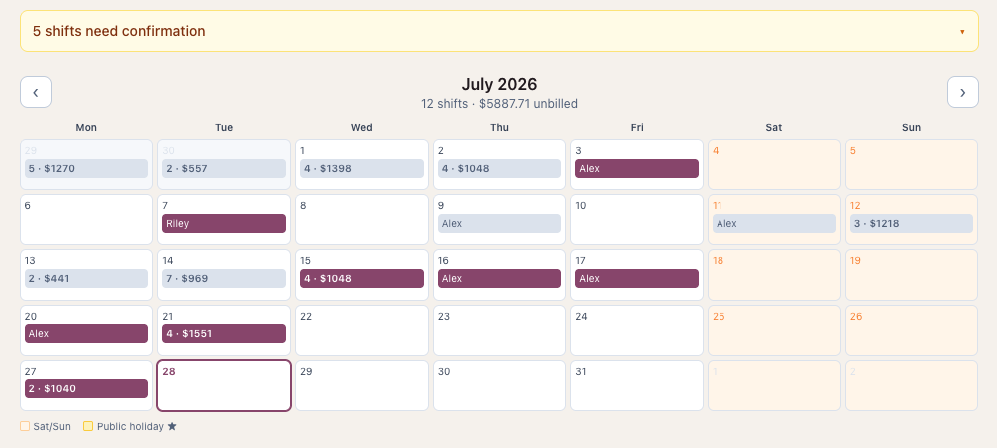
Your shifts, your drafts, what you've sent, what's still overdue and what has been paid all sit together. No separate list of who owes you, kept somewhere else and updated by hand before you can work out who to chase.
Service agreements too
Build one from details you already hold and email it to the participant, so you're not starting from a blank document. For ordinary supports the NDIA recommends having one rather than requiring it.
Only the parts you want
Send invoices from here, or send them your own way and just mark them as sent. If you already keep track of who has paid you, turn that off and it stops asking.
Start free. Pay only if it's worth it.
A free NDIS invoice template can't tell you which line item to use, what the current rate is, or that you've already billed that shift. You get all of that free, for the first six shifts you log each month. Paying buys room to log more, not the bits that keep you right. No cut of your income, however much you invoice.
Free plan
$0
no card needed, and permanent rather than a trial
- Invoicing, sending, PDFs, payment tracking and reports. No limit on any of them.
- Log up to 6 shifts a month.
- If you write shifts up by voice or let the AI read them: 20 entries and 20 minutes of recording a month.
Kygra Care Plus
$15/month
as at 26 July 2026
- Everything in the free plan, with no everyday limit on shifts logged or voice entry.
- A fair-use ceiling sits behind that to stop automated abuse. Ordinary day-to-day work won't come near it.
- Cancel whenever you like. You drop back to the free plan, and nothing you've already logged or sent goes anywhere.
Start free, upgrade any time Plus is switched on from inside the app.
Whichever you end up on, your first month from signing up is more generous than the standing free plan, so you can try voice entry properly before you decide anything. No card is needed to start and there's no trial countdown.
Fair questions
What if it gets the line item wrong and it's my name on the invoice?
You see every shift, line item and total before anything is sent, and you can change any of it. You're also warned when a line is priced at the NDIS maximum because no rate has been set for that client. It gets the sums right; you stay the one who decides what's being billed.
Is my clients' information safe?
Your clients and invoices are yours alone. No other worker using Kygra Care can see them. The Terms and Privacy Policy set out exactly what's held and who can access it, including which outside services are involved and where they are.
I don't have time to learn another app.
There's a short setup checklist that walks you through getting your details and your first client in, and it links you straight to whatever is still missing. You don't have to set everything up before you can log your first shift.
Different clients, different set-ups
One client might be plan-managed and another self-managed, with a group session or the odd overnight in between. These are the parts that keep every arrangement straight.
Different rates, same line item
Charge one client $65 an hour and another $85 for the same line item, and they stay straight, invoice after invoice, without you checking each time. A rate you've agreed stays where you set it when the caps move. Figures illustrative only.
One place instead of three
Log the shift once. The invoice is built from it, sent from the same place, and tracked to paid there too. No re-keying the same shift into a second app.
A flat price that stays flat
$15 a month (as at 26 July 2026) whatever you invoice. Not a percentage of your income, not a cost per seat, and no minimum number of staff before you can sign up.
Sorted by financial year
What you've billed and what you've been paid, by Australian financial year, ready for whoever does your tax. Kygra Care doesn't do your tax for you.
Start free, and do your first invoice.
No card, no trial clock. Set up your details, log a shift, and see what the invoice looks like before you decide anything.
Start free